AI Song Generator: Layered Vocals & Backing Vocals
Learn how to use harmony and backing vocals to thicken your chorus with an AI music generator. Step-by-step guide to choosing vocal techniques and creating richer songs.
In this article, you'll learn how to use two vocal techniques, Harmony and Backing Vocals, to make your chorus thicker. You'll see how they differ, how to select them in MuziAI, and why the AI adds parenthetical echoes to your lyrics.
Harmony vs. Backing Vocals: What's the Difference?
Harmony is a second voice that sits higher or lower than the main melody. It adds depth, like two singers hitting different notes at the same time. Backing vocals are background "ohs," "ahs," or repeated last words. They don't follow the main melody, they just create a layer behind it.
When you pick one of these techniques, the AI understands you want a fuller chorus. If you pick both, you might get a mix of harmony and backing vocals for a rich, polished sound.
How to Select Harmony and Backing Vocals in MuziAI
Open the song creation page and scroll to the Vocal section. You'll see a group of vocal techniques, including Harmony and Backing Vocals. This is group 2 in the interface.
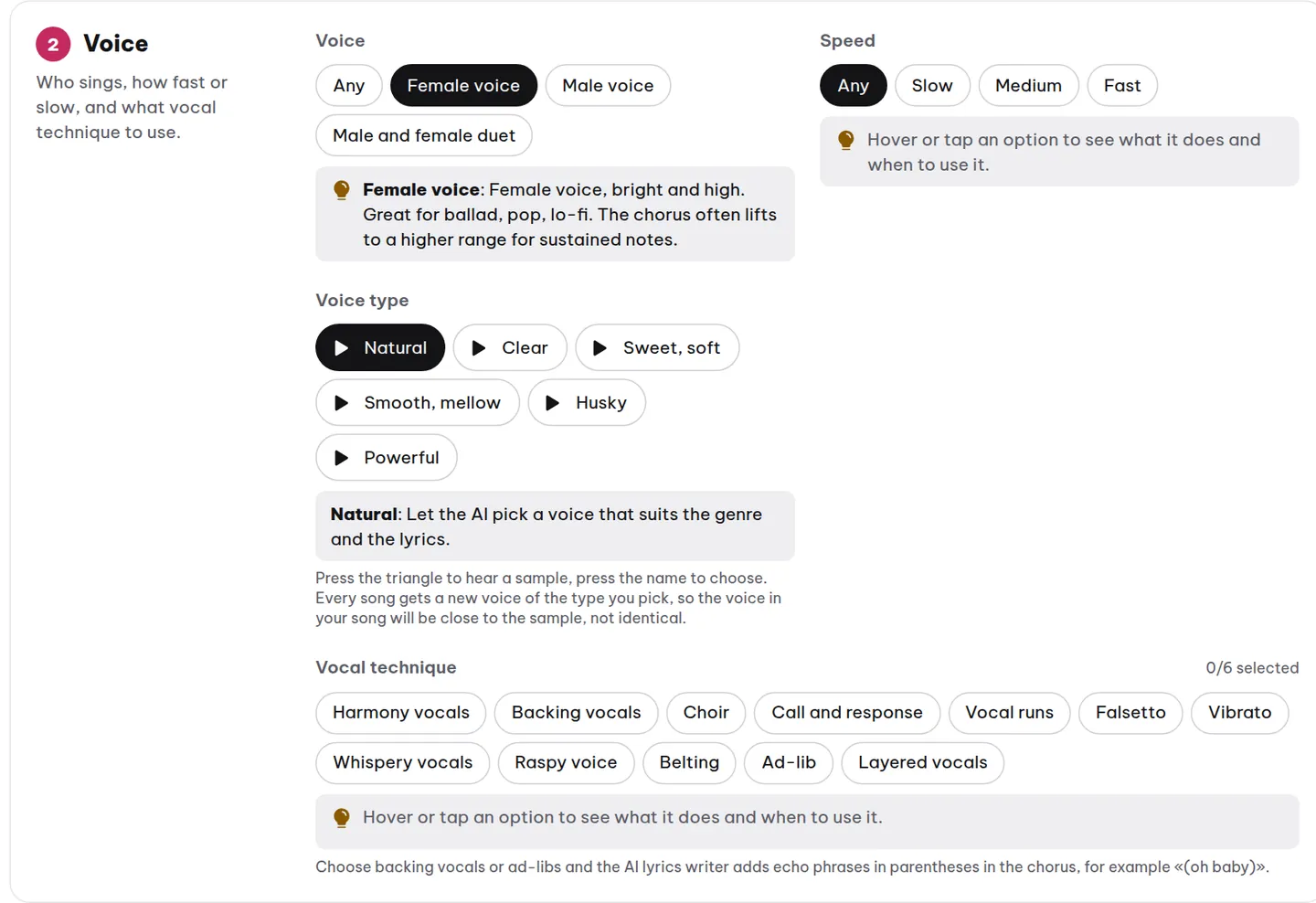
Click each technique to select it. You can choose multiple at once, but remember each is a suggestion for the AI, not a strict command. The AI will try to add harmonies or backing vocals, but it won't guarantee every note matches your expectation.
Combining Techniques
For example, if you want a high harmony plus "oh" backing vocals in the chorus, select both Harmony and Backing Vocals. For a softer feel, just choose Backing Vocals. For a powerful chorus, pair Harmony with Belting.
Why the AI Adds Parenthetical Echoes
When you select Harmony or Backing Vocals, the AI automatically inserts short echo phrases in parentheses during the chorus. For instance, if your main line is "Hold me close, never let go," the AI might add "(hold me)" or "(oh oh)" at the end. This tells the AI where to place the harmony or backing vocals.
You'll see these phrases after the AI generates the lyrics. You can keep them or edit them. If you write your own lyrics, you can add parenthetical echoes yourself, but it's optional.
Example: Lyrics with Harmony and Backing Vocals
Say you write a chorus like this:
[Chorus]
Hold me close, never let go (hold me)
Through the darkest night (oh oh)
We'll shine like the stars (ah ah)
Our love will never fade (hold me)
The words in parentheses are echoes. The AI will sing them as harmony or background vocals. If you don't like them, delete them. But if you want a thicker chorus, leave them in.
Things to Keep in Mind
Harmony and backing vocals aren't always executed perfectly by the AI. Sometimes the harmony is too quiet, or the backing vocals blend into the lead. That's normal, these are suggestions, not exact note-for-note arrangements.
If you want more control, try combining with other techniques like Choir or Layered Vocals. They also help thicken the chorus.
Create Your Song and Hear the Result
After selecting your techniques, you can let the AI write the lyrics or write your own. If writing your own, use the Write Your Own Lyrics tab to paste your lyrics.
![Write Your Own Lyrics tab with a lyrics input box and buttons to insert labels like [Chorus].](/anh/blog/en/tab-tu-viet.webp)
Click Create Song and wait about 5 to 10 minutes. When it's done, you'll hear the chorus with harmony or backing vocals. If you're not satisfied, create another version using the Create Another Version button.
Frequently Asked Questions
Can I select both Harmony and Backing Vocals at the same time?
Yes. You can select multiple vocal techniques at once. The AI will try to combine them, but the result depends on the melody and lyrics.
Why doesn't the AI sing the harmony exactly as I expected?
Because it's a suggestion, not a precise command. The AI generates harmony based on the main melody and the style you choose. Sometimes the harmony might be off by a few notes, especially with certain languages. Try creating a new version or adding another technique.
Can I add my own parenthetical echoes when writing lyrics?
Yes. You can add phrases like (hold me) or (oh oh) to your lyrics. The AI will understand those as spots for harmony or backing vocals. However, if you don't select the corresponding technique, the AI might ignore them or handle them differently.
Try it now on MuziAI
Free, no sign-up required. Share an idea, and our AI lyrics generator writes and sings a complete song.
Create Song