Split the beat and vocals from your AI song
Learn how to split beat and vocals from AI songs on MuziAI. Download MP3 stems for karaoke, remixing, or learning. Free and easy.
In this guide, you will learn how to separate the beat and vocals from your AI-generated song on MuziAI. With just one click and a wait of about 1–2 minutes, you get two separate audio files: one instrumental track and one vocal track. Both can be downloaded as MP3s, helping you create karaoke versions, remixes, or practice singing along.
Find the Beat and Vocals section
After your song is generated, you will see the music player at the top of the results page. Right below the player, there is a section labeled Beat and Vocals. This is where you perform the split. This section is located near the Download MP3 and Share buttons but serves a distinct function.
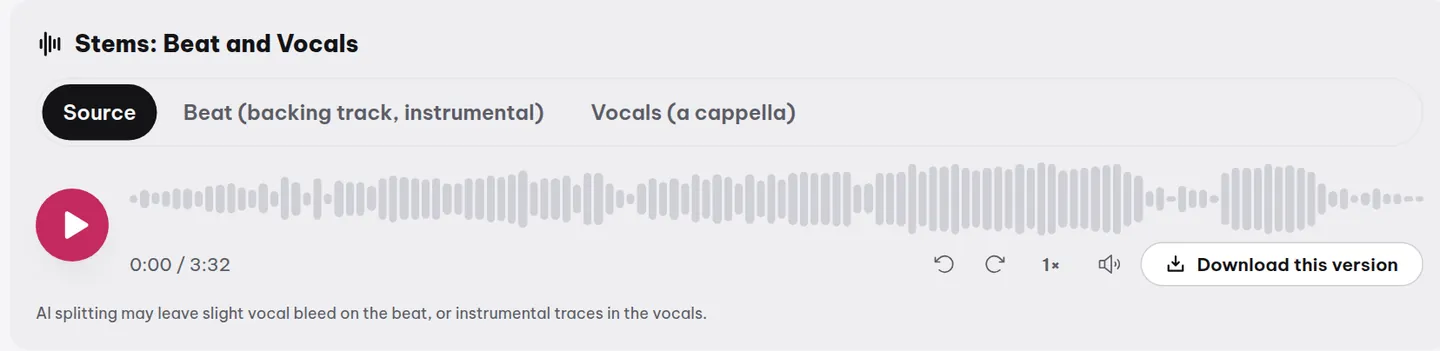
Click the Split button and wait for results
To split, simply click the Split button in the Beat and Vocals section. MuziAI processes your song using AI, separating the instruments from the vocals. This process usually takes about 1 to 2 minutes, depending on the song length and server load.
- Open the song you want to split (your song or a sample).
- Scroll down below the player and find the Beat and Vocals section.
- Click the Split button.
- Wait about 1–2 minutes. You can close the page and return later; the split will still be ready.
Get two players and two download buttons
Once the split is complete, you will see two separate players appear. The first player is Beat, containing only the instrumental track without vocals. The second player is Vocals, containing only the vocals without background music. Below each player, there are Download beat and Download vocals buttons respectively, allowing you to download them to your device as MP3s.
Preview before downloading
You should preview both versions before downloading. Click the play button on the player to check the quality. If satisfied, click the corresponding download button. If not, you can generate another version of the song and split it from scratch (remember, each song can only be split once).
Split versions are saved permanently
The split versions do not disappear after you download them. MuziAI saves both the beat and vocal stems directly on the results page. Anyone with the link to the song can listen to and re-download them. This is very useful if you want to share the beat with others or reuse it later.
Split quality: AI is not perfect
Since the separation is done by AI, the result is not absolutely perfect. Sometimes the beat track may still have a faint echo of the vocals, or the vocal track might have a slight hint of instrumental noise. This depends on the song's arrangement and the complexity of the recording. For simple songs, the split quality is usually very good.
If you need a perfect split for professional purposes, consider using dedicated stem separation tools. But for karaoke, cover singing, or practice, the split from MuziAI is more than enough.
Uses for the split tracks
The separated beat can be used for karaoke, recording your own vocals over it, or as a background for videos. The separated vocals can be used for vocal practice, analyzing singing techniques, or remixing with a different beat. If you want to import them into music software for further mixing, see the guide on importing beats and vocals into music software.
Frequently asked questions
Can I re-split a song if I am not satisfied with the result?
No. Each song can only be split once. After splitting, the Split button disappears and cannot be used again. If you want a different split, create another version of the song using the Create another version button and split from that new version.
Are the split versions available for others to view?
Yes. Anyone with the link to the song can listen to and download both split versions. So, consider this before sharing the link if you do not want others to download your beat or vocals.
Why can I still hear vocals in the beat track?
This is a limitation of AI separation technology. For songs where the vocals are deeply layered into the background music or have many sound layers, perfect separation is very difficult. You can try regenerating the song with a simpler arrangement to get a better split.
Try it now on MuziAI
Free, no sign-up required. Share an idea, and our AI lyrics generator writes and sings a complete song.
Create Song