AI Song Tempo: Slow, Medium, or Fast, How It Affects Lyrics and Music
Tempo choices, slow, medium, fast, shape lyrics and music in an AI music generator. Learn to pick the right BPM for clear vocals and the right mood.
When creating a song with an AI song generator on MuziAI, you'll see a tempo option: Slow, Medium, or Fast. Many beginners click randomly without realizing how much tempo shapes the lyrics and music. This article helps you understand each level, pick the right tempo for your content and line length, and get clear, emotional vocals from the AI.
What Is Tempo in Music and Why It Matters
Song tempo is measured in beats per minute, or BPM. The higher the BPM, the faster the song. In MuziAI, you choose from three levels: Slow, Medium, Fast. Tempo determines the rhythm of the melody, how the AI fits lyrics to each note, and the song's overall feel. A sad ballad is usually slow, while rap or EDM tends to be fast.
Three Tempo Levels and Their Effect on Lyrics
Each tempo level suits a different style of lyrics. Here's a closer look at each:
Slow: 60 to 80 BPM
Slow tempo gives the clearest vocal delivery. At 60-80 BPM, each syllable has more time to ring out, so lyrics are easy to understand, even in English with tricky consonant clusters. Great for ballads, R&B, sad songs, and love songs. You can write longer lines with more words per line, since there's plenty of room. For example, a 10-12 word line feels comfortable.
Medium: 90 to 110 BPM
Medium tempo is the balanced sweet spot, working well for pop, R&B, acoustic, and folk. Keep lines a bit shorter, around 7-9 words each, so they don't feel rushed. The AI still sings clearly, but if you write a line that's too long, the last few words might get swallowed. This is the safest choice for beginners.
Fast: Over 120 BPM
Fast tempo is for rap, hip-hop, EDM, rock, and funk. Lyrics need to be short, about 4-6 words per line, and often packed with rhymes to catch the ear. If you write long lines, the AI has to sing quickly and may stumble or drop words. Think about how you speak when you're in a hurry: short phrases, not long sentences.
Tempo and Words Per Line Must Work Together
The golden rule: the faster the tempo, the shorter the line. If you pick Fast but write a 12-word line, the AI will cram the words in, causing off-beat phrasing and muddled vocals. On the flip side, Slow tempo with very short lines (2-3 words) creates a choppy, disconnected feel.
Try reading your lyrics aloud to a beat. If you're out of breath or rushing, shorten the lines or switch to a slower tempo. MuziAI has a line counter in the Write Your Own Lyrics tab to help you track word counts.
How to Choose Tempo in MuziAI
On the song creation page, scroll down to the Style section. You'll find the Vocal group, which includes the Tempo option with three choices: Slow, Medium, Fast. Just tap one. Each choice shows a small tip when you hover over it or tap it.
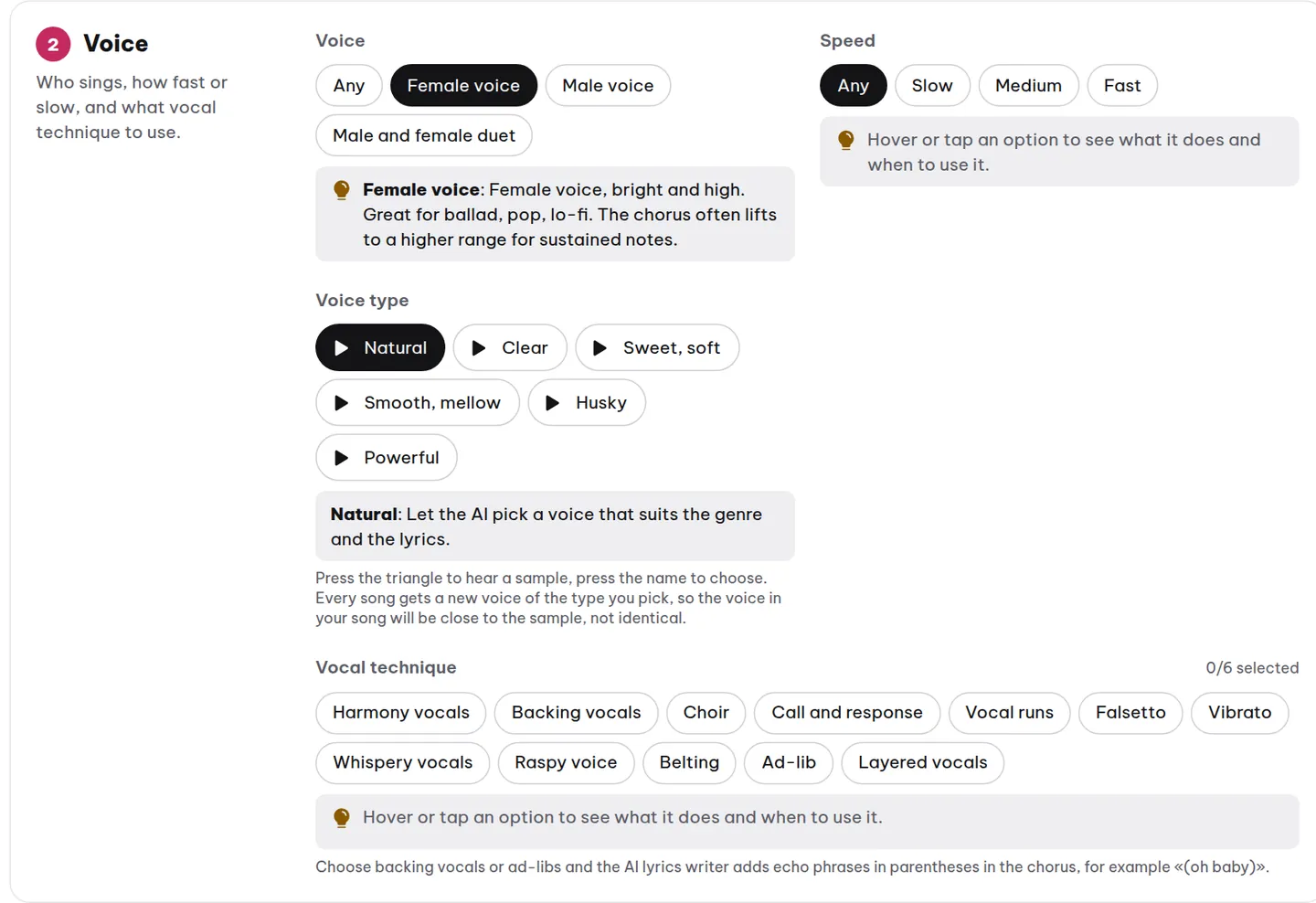
After selecting, check the Your Song Will Be summary line at the bottom of the style section to confirm your choice. Want to experiment quickly? Use the Random Suggestion button to let the AI pick for you, or try Quick Formulas with pre-set combos.
Real-World Example: Same Lyrics, Different Tempo
Say you want to write the line: "Spring is here again, and flowers bloom everywhere." At Slow tempo, this line sounds lovely, the AI sings it gently, each word clear. At Fast tempo, it's too long; the AI rushes and may drop "everywhere." Better to trim it to "Spring is here, flowers bloom" or "Spring has arrived."
Here's a sample lyric frame for Slow tempo (ballad):
[Verse]
Spring is here again, my dear
Flowers bloom everywhere, golden sun on the street
[Chorus]
Spring, oh spring, bring love back home
Give her a smile, give him a hopeful heart
And for Fast tempo (rap):
[Verse]
Spring's here, flowers bloom
Streets packed, people smile
[Chorus]
Quick, quick, spring's here
Bring the joy around
Tempo Affects Mood and Genre
Tempo isn't just about lyrics, it drives the emotional tone. Slow songs feel sad, romantic, and deep. Medium feels cheerful and light. Fast feels energetic and powerful. When you pick a genre and mood, MuziAI may suggest a matching tempo, but you should still adjust it to fit your vision.
For example, a soul ballad is usually slow, a holiday pop song can be medium or fast, and an EDM track should be fast. If you choose the Ballad genre but set the tempo to Fast, the result will sound odd. Keep tempo and genre aligned.
Quick Practice Steps
- Open MuziAI and choose the AI Write Lyrics or Write Your Own Lyrics tab.
- Write your lyrics, keeping word counts per line in mind for your planned tempo.
- Scroll to the Style section and pick the right Tempo (Slow, Medium, Fast).
- Add genre, mood, and vocal style if you like.
- Click Create Song and wait about 5-10 minutes.
- Listen back; if it's not right, create another version with a new tempo.
Frequently Asked Questions
Can I change the tempo after the song is generated?
No. Once the AI has sung the track, you can't edit the tempo or lyrics. You'll need to regenerate the song with a new tempo. Use the Create Another Version button on the results page to redo it quickly.
Which tempo gives the clearest English vocals?
Slow tempo (60-80 BPM) gives the clearest English vocals, since the AI has time to articulate each syllable and consonant cluster. Medium also works well, but Fast can blur words. If you want easy-to-understand lyrics, go with Slow or Medium.
I wrote long lyrics, should I choose Slow tempo?
Yes, Slow tempo suits longer lines because each word has more breathing room. But don't overdo it; keep lines under 12 words for smooth delivery. If your lyrics are too long, split them into more Verse and Chorus sections.
Want more on picking genre and mood? Read the genre selection guide and the mood guide. You can also browse the sample song library to hear different tempos in action.
Try it now on MuziAI
Free, no sign-up required. Share an idea, and our AI lyrics generator writes and sings a complete song.
Create Song