Share AI songs to Facebook, TikTok, Zalo easily
Learn how to share songs made with MuziAI to Facebook, TikTok, Zalo, and more. Links never expire, anyone with the link can listen.
Just created a song with MuziAI and want to show it off? This guide shows you how to share your AI song to Facebook, TikTok, Zalo, and other platforms in just a few taps. You'll learn where the Share button is, how to use each option, and rest easy knowing your song link never expires.
Where is the Share button?
After your song is generated, you'll see the results page with the music player. Right below the player, there's a row of buttons: Download MP3, Share, Create variation, and more. Tap the Share button to open the sharing panel.
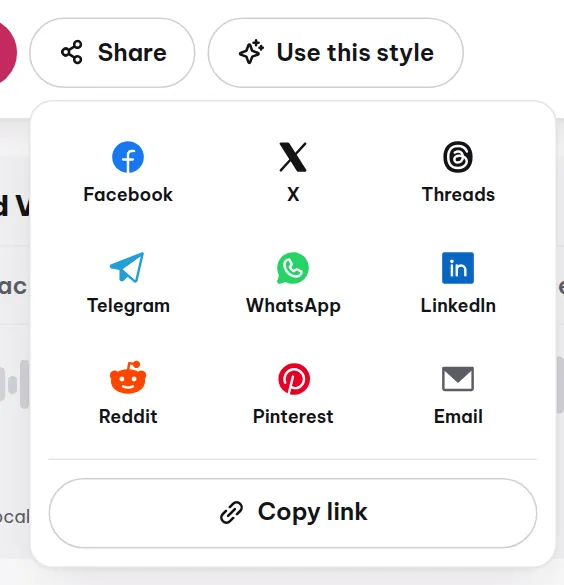
Options in the Share panel
When you tap Share, a panel appears with various social media icons. You can choose:
- Facebook: post to your timeline, send to friends, or share in groups.
- X (formerly Twitter): post a status with the link.
- Threads: share with the Threads community.
- Telegram: send to a chat or channel.
- WhatsApp: send to friends or groups.
- LinkedIn: post to your profile or company page.
- Reddit: post to a relevant subreddit.
- Pinterest: pin the song to your board.
- Email: send via email.
- Copy link: copy the URL to paste anywhere.
- More apps: opens your phone's share sheet, where you'll find Zalo, Messenger, TikTok, and other apps.
Use "More apps" to share to Zalo, Messenger, TikTok
On your phone, tap More apps. Your device will open the system share sheet, showing all installed apps like Zalo, Messenger, TikTok, and more. Pick the app you want, then follow the on-screen instructions.
Song links never expire
Every song on MuziAI has a unique link, like muziai.live/song/abc123. This link is permanent and never expires. You can send it to friends today, and they'll still be able to listen months later. This is different from many other services where links can die after a while.
How to share to Facebook
- Open your song page on MuziAI.
- Tap the Share button.
- Choose the Facebook icon.
- If you're not logged into Facebook, you'll be prompted to log in.
- Write a short description, like: "Check out this song I made with AI!"
- Tap Post.
How to share to TikTok
- Open your song page.
- Tap Share.
- Choose More apps (on mobile) or look for the TikTok icon in the list.
- TikTok will open with the song link pre-filled.
- Write a description, add hashtags like #AISong #MuziAI.
- Post a video or status with the link.
How to share to Zalo
- Open your song page.
- Tap Share.
- Choose More apps.
- In your phone's share sheet, select the Zalo icon.
- Choose the Zalo friends or group you want to send to.
- Tap Send.
Copy the link to paste anywhere
If you prefer to paste the link yourself into a post, comment, or message, use Copy link. Just tap it, and the URL is copied to your clipboard. Then paste (long-press and select Paste) anywhere: Zalo, Messenger, email, websites, etc.
Privacy notes
Your songs on MuziAI are private and don't appear in the public library. Only those with the link can listen. When you share the link, you're granting access. To revoke it, use the Delete song button on the song page (only works in the browser where you created the song).
FAQ
Do song links expire?
No. Song links on MuziAI are permanent unless you delete the song yourself. You can share anytime.
Do I need an account to share?
No. MuziAI doesn't require an account. Just open the song page and use the Share button.
Why don't I see Zalo in the share list?
Zalo isn't in the default list. Tap More apps to open your phone's share sheet, and Zalo will appear there.
Want to learn more about creating songs? Check out the guide to making your first song or explore the sample library for inspiration. If you want to write your own lyrics, visit the lyrics page.
Try it now on MuziAI
Free, no sign-up required. Share an idea, and our AI lyrics generator writes and sings a complete song.
Create Song